
Īpašs piedāvājums
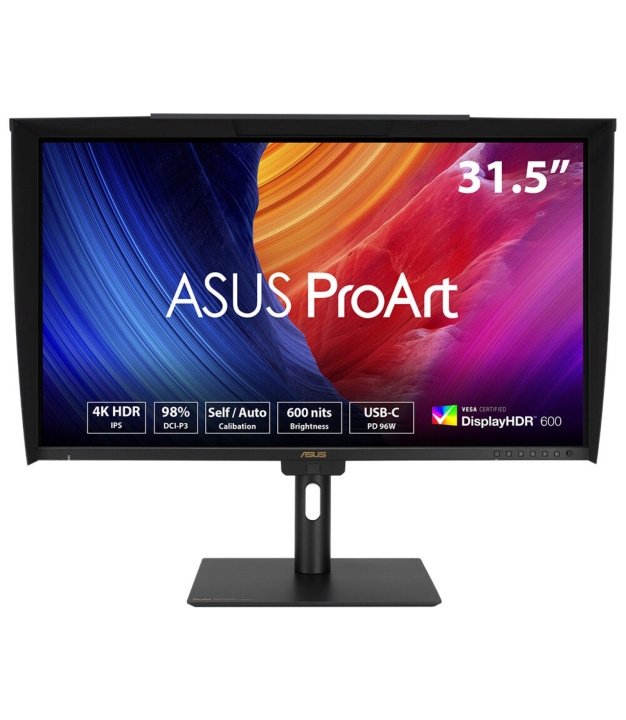
ASUS ProArt Display PA32UCE 31.5inch IPS
MPN:
90LM03H0-B02K70
Zīmols:
Asus
Ekrāna izmērs:
80 cm (31.5")
Ekrāna izšķirtspēja:
3840 x 2160 pixels
Ekrāna atsvaidzināšanas frekvence:
60 Hz
1 293,73 €
/ ar PVN
1 069,20 €
/ bez PVN
/ ar PVN
/ bez PVN
2 Darba dienas
7 noliktavā
Produkta apraksts
Atgriešanas noteikumi
Piegādes informācija
Jautājumi?
Ekspertu palīdzība tikai viena klikšķa attālumā.
Kontakti
Produkta Apraksts
4K HDR Professional Monitor
Exceptional Color Precision within Reach
ASUS ProArt Display PA32UCE is 31.5-inch 4K HDR monitors designed for video editors and colorists seeking professional-grade color accuracy. With 600 nits brightness, 98% DCI-P3 gamut, Delta E<1 color accuracy, and ASUS Light Sync for consistent backlight performance, they deliver stunning visuals in any environment. Features like a built-in motorized colorimeter, self-calibration, and LuxPixel technology ensure reliable, distraction-free use. Supporting multiple HDR formats (HLG, HDR-10) and offering extensive connectivity, including USB-C® with 96W power delivery, making PA32UCE displays ideal for creative workflows.
Empowering Content Creators
Colorists
Factory calibrated to Delta E<1 color accuracy for industry-leading color fidelity. It also offers hardware calibration support for consistent color performance.
Filmmakers & Video Editors
A high-resolution monitor with wide color gamut performance, and ultrahigh contrast is a must-have tool when producing 4K HDR content.
Designers & Photographers
Precise color reproduction brings out the details in photographs or digital artwork. PA32UCE delivers ultrahigh-quality visuals and ensures that creative details aren’t lost on the journey from click to print or production.
Exquisite 4K HDR Visuals
The 4K HDR (3840 x 2160) panel — up to 300% more onscreen space compared to similarly-sized 4K UHD displays. This increased pixel density results in sharper text and better readability, while offering enhanced visual clarity that’s ideal for creators working on detailed design projects.
Deeper Blacks, Brighter Whites
A peak brightness of 600 nits allow for outstanding contrast between the deepest blacks and gleaming whites.
Unleash Creativity with AI
The rise of generative AI enables creators to spark inspiration more quickly, bringing infinite creative possibilities to professional creators. The wide color gamut, high resolution, and professional color accuracy of ProArt Displays provide the best visual experience, enjoy a smooth creative experience, and speed up the overall workflow.
Turn Imagination into Reality Fast (Photoshop)
Discover the power of generative AI with tools for Text to Image and Generative Fill. Simplify the creative process, effortlessly create, adjust, and enhance visuals.
Seamless Perfection, Quick Video Edits
(Premiere Pro)
Generative AI tools streamline complex tasks and boost editing speed. Use features like Object Add/Remove and Generative Extend for quick, precise adjustments.
Bring Your World into 3D
(Substance 3D Sampler & Stager)
Image-to-Texture transforms generative AI for 3D artists, allowing fast creation of photorealistic textures from image. It enhances creativity while integrating smoothly into workflows.
Precise, Clear Imagery with LuxPixel™
LuxPixel™ technology is an anti-glare, low-reflection (AGLR) coating that provides a paper-like screen effect. Unlike traditional matte panels which often soften imagery, LuxPixel™ technology minimizes reflections to ensure the user sees accurate colors and sharp details.
Photorealistic Colors
ProArt monitor is equipped with ASUS Light Sync technology, featuring two sensors designed to ensure remarkable color accuracy and precise color temperature, right on startup.
A backlight sensor automatically detects backlight brightness to compensate for deviations at startup, eliminating warm-up time and ensuring accurate color performance, so you can dive straight in to work.
An ambient light sensor automatically adjusts display brightness and color temperature based on changes in environmental lighting, ensuring true colors every time.
Intuitive and Intelligent Calibration
Self Calibration
ProArt displays include a built-in colorimeter with an innovative self-calibration feature. This standalone solution is compatible with any operating system and doesn’t require additional calibration software. Users may run the calibration process at any time, or schedule it during off hours through the OSD menu.
ProArt Hardware Calibration
ASUS ProArt Hardware Calibration software* works in both SDR and HDR modes. It saves all color parameter profiles directly on the ProArt monitor’s internal scaler IC chip instead of the PC. Users can also use ProArt Calibration to schedule regular calibration intervals.
*For a list of supported color calibrators, please click Windows OS or macOS for more information.
ProArt Color Center
ProArt Color Center is an online tool designed to help administrators manage the color accuracy of multiple ProArt displays that feature hardware calibration support. Users can check when the monitors were last calibrated, next recommended calibration date, and schedule calibration times for multiple monitors―even if they’re using different color parameters and/or situated in different locations.
Seamless Calibration
ProArt Display works seamlessly with third-party Calman and Light Illusion ColourSpace CMS professional hardware calibration software. It can also write back color parameters into our ProArt displays, making calibration faster and easier.
True-to-Life Color
PA32UCE exceeds industry color reproduction standards with its 98% DCI-P3 gamuts, making it ideal for video editing and other post-production tasks. 10-bit IPS panel is able to showcase more than 1.07 billion colors to give content creators a vast color spectrum to work with.
Class-Leading Color Fidelity
Each ProArt display is factory calibrated using a new, three-scale process to guarantee industry-leading color fidelity. The display then undergoes stringent testing using ASUS advanced grayscale tracking technology to ensure smoother color gradations, better uniformity and high color accuracy with a Delta E < 1 color difference value. Each grayscale level is also carefully measured and set to ensure compliance with the precise DICOM standard for medical image check.
Create in Ultra-Vivid HDR
ASUS Smart HDR Technology
Exclusive ASUS Smart HDR technology enables ProArt Display to support multiple HDR formats, including HLG and HDR10.
HLG allows users to view and create material for broadcast and satellite TV platforms such as BBC iPlayer, Japan NHK TV, and DirecTV.
HDR10 support ensures compatibility with existing streaming video services and a growing list of HDR-enabled games.
Seamless Multitasking Across Two Devices
Built-in Auto KVM allows for effortless switching and control between two connected laptops or PCs with a single keyboard and mouse, enabling easier multitasking.
The USB-C® That Does it All
The included USB-C® port enables superfast data transfers, DisplayPort connectivity, and 96-watt power delivery to charge laptops and other devices―all via a single cable. Also serves as a USB hub: any device connected to the monitor’s USB ports gains access to other connected peripherals.
Expansive Connectivity
In addition to USB-C, ProArt display offers a myriad of connectivity options including HDMI®, DisplayPort™ with daisy-chaining, USB Type-A and additional USB-C downstream port for compatibility with a wide range of devices, also includes a passthrough port for headphones.
Streamlined, Efficient Workflows
ASUS DisplayWidget Center
ASUS DisplayWidget Center is an app that allows you to tweak monitor settings with a mouse instead of using the buttons on the monitor.
Diverse Viewing Options
Picture-by-Picture (PbP)
View content from up to four input sources simultaneously. Each window’s color mode can be configured to sRGB, Adobe RGB, DCI-P3, BT.2020, User Mode 1, User Mode 2, or User Mode 3.
Picture-in-Picture (PiP)
This mode places content from a second input source in a smaller window that can be placed in any corner of the display.
Ergonomic Design
The ergonomic stand of ProArt Displays offers tilt, swivel, pivot, and height adjustments for the perfect viewing position. Being able to pivot the screen 90° clockwise or anticlockwise to portrait orientation comes in handy when working with posters, playbills, and other large-format projects. A quick-release feature allows users to VESA mount the monitor to a wall to save desktop space.
Detachable Monitor Hood
A wraparound hood reduces on-screen reflections from nearby light sources, enabling users to work with confidence when inside the studio or on location.
Sustaining an Incredible Future
Environmental Certification
ProArt Display PA32UCE is stringently tested to meet the requirements of world-leading sustainability certifications. These tests are based on a comprehensive database of up-to-date criteria, with results independently verified. ASUS also has a structured system in place to ensure the continuous improvement of these tests.
Eco-friendly Packaging
ProArt Displays are shipped in packaging made from 100% recyclable cardboard with FSC Mix. The packaging has been designed to minimize weight and volume, helping to conserve natural resources and allowing more devices to be transported in a single shipping container.
Energy-Efficient Features
ProArt Display PA32UCE has a power-saving Eco-mode, and achieves zero-watt power consumption with hard-switch off.
Eco-friendly Materials
Extensive research and development ensure ProArt Display PA32UCE is made from eco-friendly materials like 85% post-consumer recycled (PCR) plastics. It also features eco-friendly components such as mercury-free panels.
Free 3 Months of Adobe Creative Cloud
By purchasing ASUS ProArt Display series, customers are entitled to receive a free three-month trial of Adobe® Creative Cloud® to experience the latest AI-powered applications – providing an enhanced visual experience with ProArt Display's professional color accuracy. This allows creators to inspire creativity and enjoy a smooth and exciting creative experience.
Exceptional Color Precision within Reach
ASUS ProArt Display PA32UCE is 31.5-inch 4K HDR monitors designed for video editors and colorists seeking professional-grade color accuracy. With 600 nits brightness, 98% DCI-P3 gamut, Delta E<1 color accuracy, and ASUS Light Sync for consistent backlight performance, they deliver stunning visuals in any environment. Features like a built-in motorized colorimeter, self-calibration, and LuxPixel technology ensure reliable, distraction-free use. Supporting multiple HDR formats (HLG, HDR-10) and offering extensive connectivity, including USB-C® with 96W power delivery, making PA32UCE displays ideal for creative workflows.
Empowering Content Creators
Colorists
Factory calibrated to Delta E<1 color accuracy for industry-leading color fidelity. It also offers hardware calibration support for consistent color performance.
Filmmakers & Video Editors
A high-resolution monitor with wide color gamut performance, and ultrahigh contrast is a must-have tool when producing 4K HDR content.
Designers & Photographers
Precise color reproduction brings out the details in photographs or digital artwork. PA32UCE delivers ultrahigh-quality visuals and ensures that creative details aren’t lost on the journey from click to print or production.
Exquisite 4K HDR Visuals
The 4K HDR (3840 x 2160) panel — up to 300% more onscreen space compared to similarly-sized 4K UHD displays. This increased pixel density results in sharper text and better readability, while offering enhanced visual clarity that’s ideal for creators working on detailed design projects.
Deeper Blacks, Brighter Whites
A peak brightness of 600 nits allow for outstanding contrast between the deepest blacks and gleaming whites.
Unleash Creativity with AI
The rise of generative AI enables creators to spark inspiration more quickly, bringing infinite creative possibilities to professional creators. The wide color gamut, high resolution, and professional color accuracy of ProArt Displays provide the best visual experience, enjoy a smooth creative experience, and speed up the overall workflow.
Turn Imagination into Reality Fast (Photoshop)
Discover the power of generative AI with tools for Text to Image and Generative Fill. Simplify the creative process, effortlessly create, adjust, and enhance visuals.
Seamless Perfection, Quick Video Edits
(Premiere Pro)
Generative AI tools streamline complex tasks and boost editing speed. Use features like Object Add/Remove and Generative Extend for quick, precise adjustments.
Bring Your World into 3D
(Substance 3D Sampler & Stager)
Image-to-Texture transforms generative AI for 3D artists, allowing fast creation of photorealistic textures from image. It enhances creativity while integrating smoothly into workflows.
Precise, Clear Imagery with LuxPixel™
LuxPixel™ technology is an anti-glare, low-reflection (AGLR) coating that provides a paper-like screen effect. Unlike traditional matte panels which often soften imagery, LuxPixel™ technology minimizes reflections to ensure the user sees accurate colors and sharp details.
Photorealistic Colors
ProArt monitor is equipped with ASUS Light Sync technology, featuring two sensors designed to ensure remarkable color accuracy and precise color temperature, right on startup.
A backlight sensor automatically detects backlight brightness to compensate for deviations at startup, eliminating warm-up time and ensuring accurate color performance, so you can dive straight in to work.
An ambient light sensor automatically adjusts display brightness and color temperature based on changes in environmental lighting, ensuring true colors every time.
Intuitive and Intelligent Calibration
Self Calibration
ProArt displays include a built-in colorimeter with an innovative self-calibration feature. This standalone solution is compatible with any operating system and doesn’t require additional calibration software. Users may run the calibration process at any time, or schedule it during off hours through the OSD menu.
ProArt Hardware Calibration
ASUS ProArt Hardware Calibration software* works in both SDR and HDR modes. It saves all color parameter profiles directly on the ProArt monitor’s internal scaler IC chip instead of the PC. Users can also use ProArt Calibration to schedule regular calibration intervals.
*For a list of supported color calibrators, please click Windows OS or macOS for more information.
ProArt Color Center
ProArt Color Center is an online tool designed to help administrators manage the color accuracy of multiple ProArt displays that feature hardware calibration support. Users can check when the monitors were last calibrated, next recommended calibration date, and schedule calibration times for multiple monitors―even if they’re using different color parameters and/or situated in different locations.
Seamless Calibration
ProArt Display works seamlessly with third-party Calman and Light Illusion ColourSpace CMS professional hardware calibration software. It can also write back color parameters into our ProArt displays, making calibration faster and easier.
True-to-Life Color
PA32UCE exceeds industry color reproduction standards with its 98% DCI-P3 gamuts, making it ideal for video editing and other post-production tasks. 10-bit IPS panel is able to showcase more than 1.07 billion colors to give content creators a vast color spectrum to work with.
Class-Leading Color Fidelity
Each ProArt display is factory calibrated using a new, three-scale process to guarantee industry-leading color fidelity. The display then undergoes stringent testing using ASUS advanced grayscale tracking technology to ensure smoother color gradations, better uniformity and high color accuracy with a Delta E < 1 color difference value. Each grayscale level is also carefully measured and set to ensure compliance with the precise DICOM standard for medical image check.
Create in Ultra-Vivid HDR
ASUS Smart HDR Technology
Exclusive ASUS Smart HDR technology enables ProArt Display to support multiple HDR formats, including HLG and HDR10.
HLG allows users to view and create material for broadcast and satellite TV platforms such as BBC iPlayer, Japan NHK TV, and DirecTV.
HDR10 support ensures compatibility with existing streaming video services and a growing list of HDR-enabled games.
Seamless Multitasking Across Two Devices
Built-in Auto KVM allows for effortless switching and control between two connected laptops or PCs with a single keyboard and mouse, enabling easier multitasking.
The USB-C® That Does it All
The included USB-C® port enables superfast data transfers, DisplayPort connectivity, and 96-watt power delivery to charge laptops and other devices―all via a single cable. Also serves as a USB hub: any device connected to the monitor’s USB ports gains access to other connected peripherals.
Expansive Connectivity
In addition to USB-C, ProArt display offers a myriad of connectivity options including HDMI®, DisplayPort™ with daisy-chaining, USB Type-A and additional USB-C downstream port for compatibility with a wide range of devices, also includes a passthrough port for headphones.
Streamlined, Efficient Workflows
ASUS DisplayWidget Center
ASUS DisplayWidget Center is an app that allows you to tweak monitor settings with a mouse instead of using the buttons on the monitor.
Diverse Viewing Options
Picture-by-Picture (PbP)
View content from up to four input sources simultaneously. Each window’s color mode can be configured to sRGB, Adobe RGB, DCI-P3, BT.2020, User Mode 1, User Mode 2, or User Mode 3.
Picture-in-Picture (PiP)
This mode places content from a second input source in a smaller window that can be placed in any corner of the display.
Ergonomic Design
The ergonomic stand of ProArt Displays offers tilt, swivel, pivot, and height adjustments for the perfect viewing position. Being able to pivot the screen 90° clockwise or anticlockwise to portrait orientation comes in handy when working with posters, playbills, and other large-format projects. A quick-release feature allows users to VESA mount the monitor to a wall to save desktop space.
Detachable Monitor Hood
A wraparound hood reduces on-screen reflections from nearby light sources, enabling users to work with confidence when inside the studio or on location.
Sustaining an Incredible Future
Environmental Certification
ProArt Display PA32UCE is stringently tested to meet the requirements of world-leading sustainability certifications. These tests are based on a comprehensive database of up-to-date criteria, with results independently verified. ASUS also has a structured system in place to ensure the continuous improvement of these tests.
Eco-friendly Packaging
ProArt Displays are shipped in packaging made from 100% recyclable cardboard with FSC Mix. The packaging has been designed to minimize weight and volume, helping to conserve natural resources and allowing more devices to be transported in a single shipping container.
Energy-Efficient Features
ProArt Display PA32UCE has a power-saving Eco-mode, and achieves zero-watt power consumption with hard-switch off.
Eco-friendly Materials
Extensive research and development ensure ProArt Display PA32UCE is made from eco-friendly materials like 85% post-consumer recycled (PCR) plastics. It also features eco-friendly components such as mercury-free panels.
Free 3 Months of Adobe Creative Cloud
By purchasing ASUS ProArt Display series, customers are entitled to receive a free three-month trial of Adobe® Creative Cloud® to experience the latest AI-powered applications – providing an enhanced visual experience with ProArt Display's professional color accuracy. This allows creators to inspire creativity and enjoy a smooth and exciting creative experience.
Specifikācijas
Vispārīgi
Tirgus segments
Graphics design
Sertifikāti
Energy Star EPEAT Gold TÜV Flicker-free TÜV Low Blue Light VESA DisplayHDR 600 Calman Ready FSC MIX Mac Compliance
Daļas numurs
90LM03H0-B02K70
Attēlot
HDR enerģijas patēriņš (kWh/1000h)
34 kWh
Energoefektivitātes klase (HDR)
G
Kontrasta attiecība
Statiskais kontrasta koeficients mēra, cik reižu spožāks ir tīri baltais salīdzinājumā ar tīri melno uz paneļa. Augstāks kontrasts nozīmē dziļāku melno un izteiksmīgāku attēlu. Tipiskie IPS paneļi sasniedz 1000:1, VA paneļi 3000:1, OLED paneļi - praktiski
1000:1
Krāsu dziļums
Tipiskais: 16M (8-bit) vai 1B (10-bit). Vairāk krāsu = vienmērīgāki pāreji.
1.073 billion colours
Krāsu dziļums
10 bit
Paneļa tips
Paneļa tips nosaka monitora krāsu, kontrastu un skatu leņķu raksturu. IPS = plati skatu leņķi, precīzas krāsas, mērens kontrasts; VA = augsts kontrasts un dziļa melnā krāsa, šaurāki leņķi; TN = ātrākā reakcija, bet ierobežoti leņķi; OLED = perfekta melnā
IPS
Ekrāna forma
Flat
Adaptīvā sinhronizācija
Mainīga atsvaidzes frekvences tehnoloģija (FreeSync / G-Sync Compatible) sinhronizē monitora atsvaidzes frekvenci ar GPU faktisko kadru ātrumu. Rezultāts ir bez kadru plīšanas un bez raustīšanās, kad kadru ātrums nokrīt zem monitora maksimālās atsvaidzes.
Nē
Pretspīduma ekrāns
Matēts pārklājums samazina atspīdumus gaišās vidēs; spīdīgs = spilgtākas krāsas.
Jā
Iebūvēta tīmekļa kamera
Nē
Krāsu telpa
sRGB: standarts tīmeklim/birojam. DCI-P3: kino/foto rediģēšana. Adobe RGB: pro foto.
DCI-P3, sRGB
DCI-P3 pārklājums
Kino krāsu telpa. 90%+ ir labi foto/video darbam.
98%
Horizontālā frekvence
15 - 135 kHz
Vertikālā frekvence
48 - 60 Hz
Maksimālais spilgtums
600 cd/m²
Tipiskais spilgtums
600 cd/m²
Ekrāna tehnoloģija
IPS: plati leņķi. VA: augsts kontrasts. OLED: perfektas melnās krāsas. TN: ātrs odzejs.
LED
Bez mirgošanas
Samazina acu nogurumu, novēršot fona apgaismojuma mirgošanu visos spilgtuma līmeņos.
Jā
Izšķirtspējas klase
FHD=1920×1080, QHD=2560×1440, 4K=3840×2160, OLED norāda paneļa tipu.
4K Ultra HD
HDR atbalsts
Augsts dinamiskais diapazons . plašāks spilgtuma un krāsu diapazons reālistiskākam saturam.
Jā
HDR standarts
HDR10: pamata. HDR10+/Dolby Vision: dinamiskā metadati labākiem rezultātiem.
DisplayHDR 600, High Dynamic Range 10 (HDR10), Hybrid Log-Gamma (HLG)
Fona apgaismojums
Malas apgaismojums: plānāks, mazāk vienmērīgs. Pilns masīvs: spilgtāks, lokālā aptumšošana.
Jā
Mazs zilās gaismas līmenis
Aparatūras zilās gaismas filtrs acu noguruma samazināšanai garās sesijās.
Jā
Ekrāna proporcijas
16:9 = standarta platekrāns. 16:10 = vairāk vertikālas vietas. 21:9 = ultraplatais.
16:9
NVIDIA G-Sync
NVIDIA G-Sync ir mainīga atsvaidzes frekvences tehnoloģija, kas iebūvēta saderīgās NVIDIA GPU. Tā sinhronizē monitora atsvaidzes frekvenci ar GPU faktisko kadru ātrumu, novēršot plīšanu un raustīšanos. G-Sync Ultimate prasa aparatūras moduli monitorā; G-S
Nē
Pikseļu solis
0.182 x 0.182 mm
Pārslēgšanās laiks
Pikseļa reakcijas laiks (ms) ir, cik ilgi pikselim nepieciešams, lai mainītu krāsu. Zemāki skaitļi samazina kustību izsmērēšanos un 'spokus' ātrās ainās. 1-5 ms ir piemēroti spēlēm; 5-10 ms ir pieņemami produktivitātei. Ražotāji parasti norāda labāko GtG
5 ms
Atbildes laika mērījuma veids
GtG (pelēks uz pelēku) ir nozares standarts. MPRT ietver kustības miglojumu.
GTG (Gray to Gray)
sRGB pārklājums
Standarta krāsu telpa tīmeklim un birojam. 100% sRGB ir pamata mērķis.
100%
Skārienekrāns
Nē
Adaptīvā sinhronizācija (VRR)
Mainīgais atsvaidzināšanas ātrums novērš plīsumus. Darbojas ar AMD un NVIDIA GPU.
Jā
Skatāmā platuma izmērs
69.7 cm
Skatāmā augstuma izmērs
39.2 cm
Horizontālais skatīšanās leņķis
IPS paneļi parasti 178°. Šaurāki leņķi (TN) izraisa krāsu nobīdi no sāniem.
178°
Vertikālais skatīšanās leņķis
178°
On Screen Display Osd
Jā
Picture In Picture
Jā
Pikseļu blīvums
PPI (pikseļi uz collu). Augstāks = asāks attēls. 220+ PPI ir Retina kvalitāte.
140 ppi
Savienojumi
DisplayPort versija
DisplayPort versija nosaka maksimālo izšķirtspēju un atsvaidzi. DP 1.4 = 4K pie 120 Hz, 8K pie 60 Hz ar DSC; DP 2.1 = 4K pie 240 Hz, 8K pie 120 Hz. DisplayPort parasti nodrošina augstākas atsvaidzes spēlēm draudzīgākus režīmus nekā HDMI tādā pašā paaudzē.
1.4
DisplayPort pieslēgvietu skaits
2
HDCP
HDCP (High-bandwidth Digital Content Protection) ir kopēšanas aizsardzības signalizācija, kas nepieciešama, lai atskaņotu DRM aizsargātu 4K un 8K video (Netflix UHD, Blu-ray, straumēšanas pakalpojumi). Bez HDCP atbalsta gan GPU, gan displeja pusē šādas pl
Jā
HDCP versija
2.2
HDMI
Jā
HDMI pieslēgvietu skaits
2
HDMI versija
HDMI versija nosaka maksimālo atbalstīto izšķirtspēju un atsvaidzes frekvenci. HDMI 2.0 = 4K pie 60 Hz, HDMI 2.1 = 4K pie 120 Hz vai 8K pie 60 Hz ar HDR. Lai darbinātu 4K120, HDMI kabelim, avotam un displejam visiem jābūt 2.1.
2.1
Austiņu izeja
Jā
Austiņu izejas
1
USB-C DisplayPort Alt-Mode
Jā
Iebūvēts USB centrmezgls
Jā
USB centrmezgla versija
3.2 Gen 1 (3.1 Gen 1)
USB Type-A lejupejošo pieslēgvietu skaits
2
USB Type-C lejupejošo pieslēgvietu skaits
1
Funkcijas
Built In Kvm Switch
Jā
Audio
Austiņu izeja
3.5 mm
Iebūvētie skaļruņi
Jā
Iebūvēto skaļruņu skaits
2
Audio jauda (RMS)
Nepārtrauktā nominālā jauda vatos. Augstāka = skaļāks maks. skaļums.
4 W
Barošana
SDR enerģijas patēriņš (kWh/1000h)
21 kWh
Energoefektivitātes klase (SDR)
D
USB Power Delivery
Ļauj uzlādēt caur USB-C. PD vati nosaka uzlādes ātrumu.
Jā
Patēriņš (izslēgts)
0 W
Patēriņš (miega režīmā)
0.5 W
Tipiskais enerģijas patēriņš
Tipiskā kartes jauda (W) ir enerģijas patēriņš normālas spēļu slodzes laikā. Izmantojiet to, lai aprēķinātu elektrības izmaksas un izvēlētos dzesēšanu. Maksimālie īslaicīgie pīķi var būt par 20-30 procentiem augstāki, tāpēc PSU ieteikumiem ir paredzēta re
25.64 W
USB-C uzlādes jauda
Maksimālā jauda, ko doks spēj nodrošināt pievienotajam klēpjdatoram pa USB-C. 100 W der lielākajai daļai klēpjdatoru; 140 W nepieciešams augstas jaudas spēļu vai darbstaciju klēpjdatoriem.
96 W
Ievades frekvence
50/60 Hz
Ievades spriegums
100 - 240 V
Gaidstāves jauda
0.5 W
Barošanas tips
Internal
Fiziskie parametri
Maks. augstuma regulējums
12 cm
Kabeļa slēdzenes ligzdas tips
Kensington
Dziļums (ar statīvu)
240 mm
Dziļums (bez statīva)
46.8 mm
Statīva krāsa
Black
Augstuma regulēšana
Jā
Augstums (ar statīvu)
617.9 mm
Augstums (bez statīva)
438.2 mm
Stiprinājuma saskarne
100 x 100 mm
Pagriešana (portreta režīms)
Ļauj pagriezt monitoru par 90° portreta orientācijai (programmēšana, dokumenti).
Jā
Pagriešanas leņķa diapazons
-90 - 90°
Statīvs iekļauts
Jā
Horizontālās pagrieziena leņķis
Cik tālu monitors var pagriezties pa kreisi/labi uz statīva.
-30 - 30°
Horizontālā pagrieziena regulēšana
Jā
Noliekuma regulēšana
Jā
Noliekuma regulēšana
-5 - 23°
VESA stiprinājums
VESA caurumu izkārtojums (piem. 100×100 mm) monitora turētājiem un sienas stiprinājumiem.
Jā
Sienas montāža
Jā
Svars (ar statīvu)
8.9 kg
Svars (bez statīva)
5.8 kg
Platums (ar statīvu)
714.2 mm
Platums (bez statīva)
714.2 mm
Noņemams statīvs
Jā
Papildus
Energoefektivitātes skala
A to G
Kabeļa slēdzenes ligzda
Jā
Ilgtspējas sertifikāti
ENERGY STAR, EPEAT Gold, Forest Stewardship Council (FSC) Mix
SKU
48059716
EAN
4711387717479