
Special offer
Out of Stock
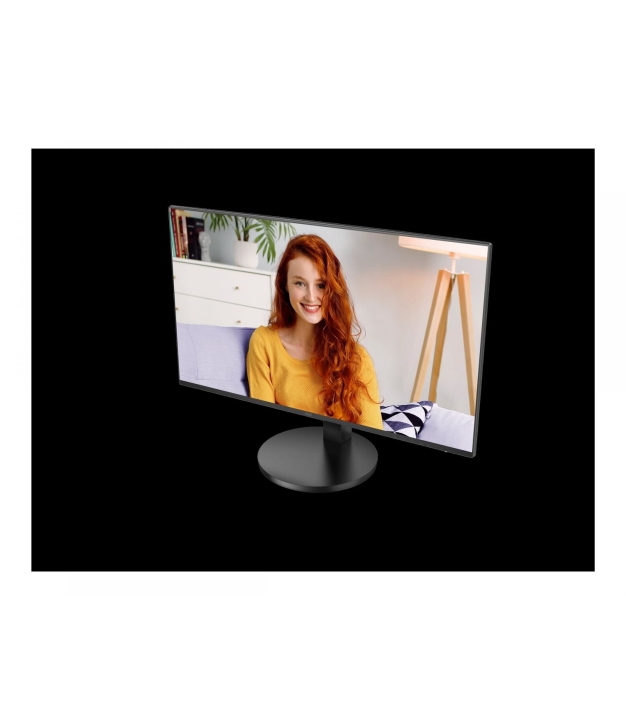
AOC Q27B3CF2 27inch 2560x1440 100Hz IPS
MPN:
Q27B3CF2
Brand:
AOC
Screen Size:
68.6 cm (27")
Resolution:
2560 x 1440 pixels
Refresh Rate:
100 Hz
€322.40
/ incl. VAT
€266.45
/ excl. VAT
/ incl. VAT
/ excl. VAT
This product is currently out of stock.
Subscribe to back in stock notification.
Return Policy
Delivery Information
Have questions?
Expert help just one click away
Contact Us
Product Description
AOC Q27B3CF2 27inch 2560x1440 100Hz IPS Flat 110mm USB-C Dock 65W AdaptiveSync USB HUB Speakers Low Blue Mode USB C HDMI 350cd/m2
Specifications
General
Market Segment
Home
Adobe Rgb Coverage
103.5%
Bt 2020 Coverage
70.1%
Ddc Ci
Yes
Haze Rate
25%
Local Dimming
Yes
Low Input Lag
No
Part Number
Q27B3CF2
Surface Hardness
3H
Display
Contrast Ratio
Static contrast ratio measures how much brighter pure white is than pure black on the panel. Higher contrast means deeper blacks and more punch. Typical IPS panels reach 1000:1, VA panels 3000:1, OLED panels effectively infinite contrast.
1500:1
Colour Depth
Typical: 16M (8-bit) or 1B (10-bit). More colours = smoother gradients.
16.7 million colours
Panel Type
Panel type sets the colour, contrast and viewing-angle character of the monitor. IPS = wide viewing angles, accurate colour, moderate contrast; VA = high contrast and deep blacks, narrower angles; TN = fastest response but limited angles; OLED = perfect b
IPS
Screen Shape
Flat
Anti-Glare
Matte coating reduces reflections in bright environments; glossy = more vivid colours.
Yes
Built-in Webcam
No
Colour Space
sRGB: standard for web/office. DCI-P3: cinema/photo editing. Adobe RGB: pro photo.
sRGB
DCI-P3 Coverage
Cinema colour space. 90%+ is good for photo/video work.
96.2%
Vertical Frequency
48 - 100 Hz
Typical Brightness
350 cd/m²
Screen Size (cm)
68.6 cm
Flicker-Free
Reduces eye strain by eliminating backlight flicker at all brightness levels.
Yes
Resolution Class
FHD=1920×1080, QHD=2560×1440, 4K=3840×2160, OLED refers to panel type.
Quad HD
HDR Support
High Dynamic Range . wider brightness and colour range for more realistic content.
Yes
Backlight
Edge-lit: thinner, less uniform. Direct-lit/Full-array: brighter, local dimming.
Yes
Low Blue Light
Hardware filter for blue light to reduce eye strain during long sessions.
Yes
Aspect Ratio
16:9 = standard widescreen. 16:10 = more vertical space. 21:9 = ultrawide.
16:9
Pixel Pitch
0.2331 x 0.2331 mm
Transfer Time
Pixel response time (ms) is how long a pixel needs to change colour. Lower numbers cut motion blur and ghosting in fast scenes. 1-5 ms is fine for gaming; 5-10 ms is acceptable for productivity. Manufacturers usually quote the best-case GtG number; real-w
14 ms
Response Time Measurement
GtG (Grey to Grey) is the industry standard. MPRT includes motion blur.
GTG (Gray to Gray)
sRGB Coverage
Standard colour space for web and office use. 100% sRGB is the baseline target.
120.8%
Adaptive Sync (VRR)
Variable Refresh Rate eliminates tearing. Works with both AMD and NVIDIA GPUs.
Yes
Horizontal Viewing Angle
IPS panels typically 178°. Narrower angles (TN) cause colour shifts from the side.
178°
Vertical Viewing Angle
178°
Colour Gamut
Percentage of a colour space the display can reproduce. Higher = more vivid colours.
99%
Dynamic Contrast Ratio
20000000:1
Backlight Type
W-LED
Bezel Thickness Type
Ultra Narrow
Front Bezel Colour
Black
LED Indicators
Operation, Stand-by
Ntsc Coverage Typical
105.3%
Pixel Density
PPI (pixels per inch). Higher = sharper image. 220+ PPI is Retina-quality.
109 ppi
Response Time Mprt
1 ms
Print
Horizontal Scan Range
30 - 115 kHz
Vertical Scan Range
48 - 100 Hz
Storage
MTBF
Mean Time Between Failures . statistical lifespan estimate in hours.
30000 h
Connectivity
HDCP
HDCP (High-bandwidth Digital Content Protection) is the copy-protection signalling required to play DRM-protected 4K and 8K video (Netflix UHD, Blu-ray, streaming services). Without HDCP support on both the GPU and the display, those streams downscale or
Yes
HDCP Version
2.2
HDMI Ports
1
HDMI Version
HDMI version determines the maximum supported resolution and refresh rate. HDMI 2.0 = 4K at 60 Hz, HDMI 2.1 = 4K at 120 Hz or 8K at 60 Hz with HDR. To run 4K120 the HDMI cable, source and display must all be 2.1.
2.0
Headphone Output
Yes
Headphone Outputs
1
USB-C DisplayPort Alt-Mode
Yes
Built-in USB Hub
Yes
DVI Port
No
Hdmi Cable Length
1.5 m
Usb Hub Version
3.2 Gen 1 (3.1 Gen 1)
Usb Type A Downstream Ports Quantity
2
Usb Type C Downstream Ports Quantity
1
Features
Built In Kvm Switch
No
Audio
Audio Input
No
Headphone Output
3.5 mm
Built-in Speakers
Yes
Built-in Speakers
2
Audio Power (RMS)
Continuous rated power in Watts. Higher = louder max volume.
4 W
Built-in Microphone
No
Microphone Input
No
Power
USB Power Delivery
Allows charging via USB-C. PD wattage determines charging speed.
Yes
Power Consumption (Off)
0.3 W
Typical Power Draw
Typical board power (W) is the power draw under normal gaming load. Use it to estimate electricity cost and to size cooling. Peak transient spikes can be 20-30 percent higher, which is why PSU recommendations leave a buffer.
35 W
USB-C Charging Power
Maximum wattage the dock can deliver to the connected laptop over USB-C. 100 W suits most laptops; 140 W is needed for high-power gaming or workstation laptops.
65 W
Input Frequency
50/60 Hz
Input Voltage
100 - 240 V
Standby Power
0.5 W
Max Power Draw
135 W
Power Supply Type
Internal
Physical
Max Height Adjustment
11 cm
Cable Lock Slot Type
Kensington
Depth (with stand)
229.8 mm
Depth (without stand)
356.7 mm
Height Adjustment
Yes
Height (with stand)
508.6 mm
Height (without stand)
45.6 mm
Mounting Interface
100 x 100 mm
Pivot (Portrait Mode)
Allows rotating the monitor 90° for portrait orientation (coding, documents).
No
Stand Included
Yes
Swivel Adjustment
No
Tilt Adjustment
Yes
Tilt Adjustment
-5 - 25°
VESA Mounting
VESA hole pattern (e.g. 100×100 mm) for monitor arms and wall mounts.
Yes
Weight (with stand)
5.51 kg
Weight (without stand)
3.97 kg
Width (with stand)
616.6 mm
Width (without stand)
616.6 mm
Detachable Stand
Yes
Additional
Cable Lock Slot
Yes
SKU
47099731
EAN
4038986181464