
Mini PCs & NUC
8 results
Mini PCs & NUC
8 results
A Mini PC is a small form-factor Desktop, typically the size of a paperback book or smaller, that delivers full PC functionality in a compact case. The category includes thin clients used as terminals against a remote server, modular bare-bones Mini systems, and complete pre-configured small Desktops; many models can hide on a VESA (mounting standard) mount behind a monitor.
Loading...



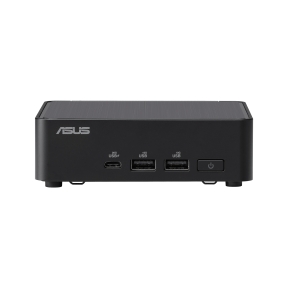
MPN: RNUC14RVKU500002I
COMPUTING KIT CU5-125H/RNUC14RVKU500002I ASUS
UCFF
Intel Core Ultra 5
Windows 11
UCFF
Intel Core Ultra 5
Windows 11

Mini PCs and NUC
Mini PCs are full desktop computers in a chassis the size of a hardback book or smaller. They mount behind a monitor with a VESA (mounting standard) bracket, sit on a desk shelf, or hide in a drawer. For office and information-worker roles where the user works from one place but desk space is tight, mini PCs are often the cleanest answer.
What this category covers
Intel NUC family and the equivalent compact systems from major vendors (HP Mini, Lenovo ThinkCentre M Tiny, Dell OptiPlex Micro), branded mini PCs from specialist makers, and silent fanless designs intended for kiosks, digital signage and meeting room media players.
How to choose a mini PC
Match performance to the workload
Modern mini PCs handle office work, video calls and most creative tasks comfortably; the U-series and similar low-power CPUs inside them are the same processors used in business notebooks. For 3D rendering, simulation, multi-display 4K video editing or other heavy workloads, the thermal envelope of a mini PC starts to limit sustained performance compared to a tower.
Confirm display outputs
Most mini PCs drive two or three displays through a mix of HDMI, DisplayPort and USB-C (Universal Serial Bus Type-C). For dual or triple 4K setups, check the specific output combinations the mini PC supports; not all combinations work at full resolution and refresh rate.
Plan storage and memory at purchase
Most business mini PCs offer one M.2 slot and one SODIMM (Small Outline DIMM) bay, sometimes a 2.5-inch drive bay. Specifying enough memory and storage at order time is easier than a service visit later. 16 GB and a 512 GB SSD is the modern starting point for office mini PCs.
Consider the deployment context
Standard mini PCs suit office desks. Fanless designs trade a small performance ceiling for silent operation, useful for meeting rooms, libraries and digital signage. Industrial mini PCs add wider operating temperature ranges, DIN-rail mounting and longer-term parts availability for factory and vehicle deployments.
Key features to compare
VESA mount and cable management
A VESA mount bracket lets the mini PC ride behind the monitor; the only visible cables are power and the display cable. For multi-monitor setups, mounting the mini PC at the desk edge is sometimes cleaner.
Wireless
Most current mini PCs ship with Wi-Fi 6 or 6E and Bluetooth 5.x. For meeting rooms and other roles where wireless is the only connection, this matters; for office desks with wired Ethernet, less so.
Connectivity
Front USB for quick connections, rear USB for permanent peripherals, USB-C with Power Delivery for users with notebook-class peripherals. Confirm the rear panel matches the daily peripheral mix.
What to check before buying
- Workload class and any sustained-load tasks?
- Number and resolution of external displays?
- Memory and storage sized for the unit's full service life?
- Mounting plan: behind monitor, on desk, on shelf, in cabinet?
- Warranty and on-site service for fleet roll-outs?
Frequently asked questions
Are mini PCs as fast as desktops?
For typical office work, yes; modern mini PCs match the perceived speed of desktops with the same generation CPU. For sustained heavy workloads, the smaller cooling system limits how long the CPU can hold its boost clock, so a tower with the same nominal CPU finishes long jobs faster.
Can a mini PC drive three 4K displays?
Many current mini PCs can. Check the spec sheet for the exact combination: most support two 4K at 60 Hz easily, three 4K at 60 Hz needs higher-end models or a dedicated graphics option. The integrated GPU also affects what is realistic.
Do mini PCs need active cooling?
Standard mini PCs use a small fan that is usually quiet under office load. Fanless mini PCs use a passive heatsink and are completely silent, useful for libraries, meeting rooms and other quiet environments, at the cost of a slightly lower performance ceiling.
Is a NUC the same as a mini PC?
Intel NUC (Next Unit of Computing) is one specific brand of mini PC. The same form factor is sold by other vendors under their own names (HP Mini, Lenovo ThinkCentre M Tiny, Dell OptiPlex Micro). Functionally they overlap; the differences are in fleet management features, manufacturer warranty options and exact internal layout.
Can mini PCs be used as servers?
For light edge tasks (network monitoring, home automation, small databases), yes. For production server roles requiring redundancy, ECC (Error-Correcting Code) memory and out-of-band management, a proper server platform is the right choice. Mini PCs are workstations, not infrastructure.