
Powerline Adapters
5 results
Powerline Adapters
5 results
Powerline adapter pairs that turn a building's electrical wiring into a wired network extension. The selection covers basic AV600 and AV1000 starter kits, AV2-MIMO models with rated speeds up to 2 Gbps, kits with built-in Wi-Fi extenders for adding wireless to a remote room, and adapters with pass-through power sockets so the wall outlet is not lost.
Loading...

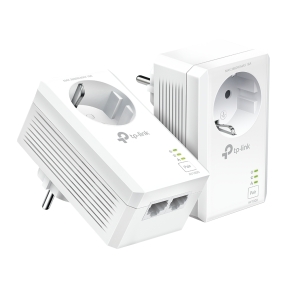

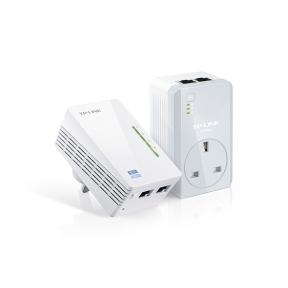

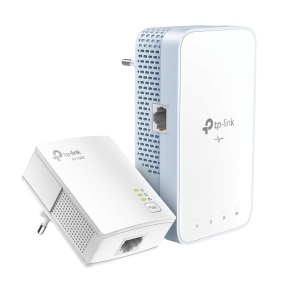

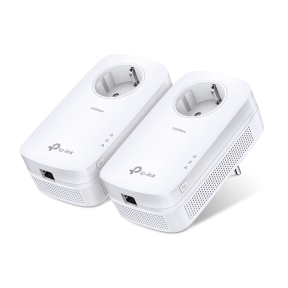

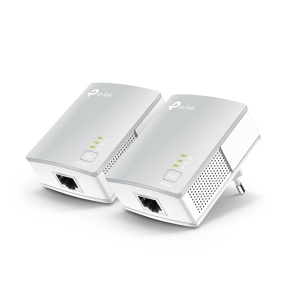
Powerline adapters for extending the network through electrical wiring
Powerline adapters are a niche but useful answer to a common problem: getting Ethernet to a room where pulling cable is not an option. They run the network signal over the building's electrical wiring, so any room with a power socket on the same circuit can plug in a second adapter and get a wired network connection. Performance depends heavily on the wiring; results vary.
What this category covers
Starter kits with two adapters for the simplest sender-and-receiver setup; multi-pack kits with three or more adapters for several rooms; powerline kits with built-in Wi-Fi extenders; pass-through models that include a power socket so the wall outlet is not lost; and AV2-MIMO models that use multiple wires in the electrical cable for higher speeds.
How to choose a powerline adapter
Match the standard to the actual need
AV600 (600 Mbps headline) is fine for office work, web and HD video. AV1000 and AV2 (up to 2 Gbps) are useful when 4K streaming or large file transfers are involved. Real throughput is far below the headline; assume 30 to 50 percent of the rated figure in typical homes.
Pick pass-through if a socket is at stake
Pass-through models include a built-in power socket on the front, so the wall outlet remains available for other devices. Non-pass-through adapters block the socket entirely, which is a real annoyance in rooms with limited outlets.
Decide on built-in Wi-Fi
Some powerline kits include Wi-Fi on the receiving adapter, turning a remote room into a Wi-Fi access point. This is simpler than running a separate AP from the powerline Ethernet port, but the Wi-Fi quality is usually basic compared to a proper access point.
Use the same brand on both ends
HomePlug AV2 is a standard, but vendor implementations differ. Mixing brands often works at the lowest common standard, sometimes does not work at all. For best results, both adapters should be from the same manufacturer and ideally the same model line.
Key features to compare
Number of adapters in the kit
A two-adapter kit covers one sender and one receiver. Three- and four-adapter kits cover multiple rooms from a single source. Most homes start with two and add more later.
Encryption
Powerline traffic crosses the building's wiring and may be visible on adjacent units sharing the same electrical phase (apartment buildings, terraced houses). Built-in 128-bit AES encryption is standard on current models and worth confirming on the spec sheet.
What to check before buying
- Is the source room on the same electrical circuit as the destination?
- What is the actual file or stream size powerline needs to carry?
- Does the wall socket at either end need to remain available (pass-through model)?
- Is built-in Wi-Fi at the remote end useful, or will a separate AP be used?
- Are both adapters the same brand for best compatibility?
Frequently asked questions
Why is my powerline speed so much lower than advertised?
Headline speeds assume ideal lab conditions. Real homes have older wiring, multiple circuits, motor loads (fridges, air conditioners), and electrical noise that all reduce throughput. Plan for 30 to 50 percent of the headline figure in typical conditions, less in older buildings.
Can I plug powerline adapters into a power strip?
Generally no. Power strips, surge protectors and UPS units filter out the high-frequency signals powerline uses, killing performance. Plug powerline adapters directly into wall sockets. Pass-through models include a filtered socket on the front that other devices can use without affecting performance.
Will powerline work between different rooms?
Yes, if both rooms are on the same electrical phase and on circuits that share the building's main panel without too much filtering between them. Older houses with many sub-circuits may have problems; modern houses usually work. Adjacent units in apartment buildings often share enough wiring for it to work too, which is why encryption matters.
Powerline or Wi-Fi mesh for extending coverage?
For wired extension to one specific spot (a desk, a TV, a games console), powerline is simpler and gives a stable wired link. For full-house wireless coverage, Wi-Fi mesh systems are usually a better fit. Some users combine both: powerline backhaul to mesh nodes for higher per-node bandwidth.
Do powerline adapters work in offices?
They can, but offices usually have proper structured cabling and access points, so the use case is rare. Powerline shows up most often in older buildings where pulling Ethernet is impractical, in retail kiosks at the back of a store, and in small home offices.