
Gaming Peripherals
32 results
Gaming Peripherals
32 results
Gaming-grade peripherals for PC and console: mechanical keyboards with linear, tactile and clicky switches; lightweight gaming mice with high-DPI sensors; first-party and third-party controllers for current consoles; gaming headsets with surround sound; mousepads and capture cards. The selection covers wired and wireless options for fixed-desk and shared setups across both casual and competitive play.
Loading...

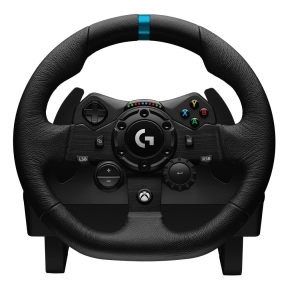
MPN: 941-000149
STEERING WHEEL G923/941-000149 LOGITECH
Steering wheel + Pedals
PC, PlayStation 4, PlayStation 5
Wired
Steering wheel + Pedals
PC, PlayStation 4, PlayStation 5
Wired

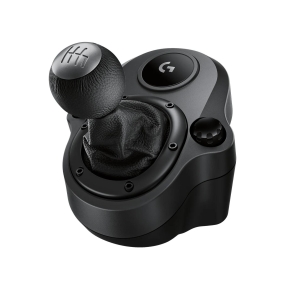
MPN: 941-000130
STEERING WHEEL ACC SHIFTER/941-000130 LOGITECH
Special
PC, PlayStation 4, Xbox One
Wired
Special
PC, PlayStation 4, Xbox One
Wired
Gaming keyboards, mice, controllers and accessories for PC and consoles
Gaming peripherals are where the user touches the game. A high-end console with a worn-out controller or a fast PC with a cheap keyboard underperforms; the peripherals are often the cheapest upgrade with the most-felt impact. The category covers the four main peripheral classes for both PC and console gaming.
What this category covers
Mechanical gaming keyboards with major switch types (Cherry MX, Razer, Logitech GX); ultra-light gaming mice with high-DPI sensors; controllers for PlayStation, Xbox and PC including Pro and Elite controllers; gaming headsets with surround sound and detachable microphones; speed-glide mousepads; and game capture cards for streaming and content creation.
How to choose gaming peripherals
Pick keyboard switches by the play style
Linear switches (Cherry MX Red, Razer Linear) actuate smoothly with no tactile bump, suiting fast-paced shooters where consistent presses matter. Tactile switches (Cherry MX Brown) give a noticeable bump at actuation, suiting all-round use and typing alongside gaming. Clicky switches (Cherry MX Blue) add an audible click; satisfying for typing but loud in shared rooms.
Match mouse weight and sensor to the game
Modern competitive gaming mice weigh 50 to 75 grams; lighter mice are easier to flick across a pad for fast aim. High-DPI sensors (above 16,000 DPI) sound impressive but most gamers play at 800 to 3,200 DPI; what actually matters is sensor accuracy at low DPI. Wired vs wireless: current premium wireless mice match wired latency.
Choose the controller for the platform
For PlayStation 5, the DualSense controller is required; the haptic feedback and adaptive triggers are central to many PS5 games. For Xbox Series X|S, the Xbox Wireless Controller is universal across Xbox and PC. Third-party Pro and Elite controllers add programmable buttons, swappable thumbsticks and longer manufacturer warranty periods.
Pick a gaming headset with mic
Most gaming headsets bundle headphone and microphone; the microphone arm pushes near the mouth for clear voice. Wireless 2.4 GHz with USB dongles offers low latency and long battery life. Surround sound (real or simulated) helps in competitive shooters where audio cues reveal enemy positions.
Key features to compare
Polling rate
1,000 Hz (1 ms) is the modern default for keyboards and mice. 4,000 and 8,000 Hz exist on premium gear; the visible difference is small but consistent at high frame rates.
RGB and software
RGB lighting is universal at premium tiers and largely cosmetic. The peripheral's software (Razer Synapse, Logitech G Hub, Corsair iCUE) handles macros and lighting; for fleet use in offices, the software matters for compatibility with corporate IT policies.
Wired or wireless
Wired removes battery management and offers the lowest latency. Modern wireless gaming peripherals match wired latency and add freedom of movement. The choice is mostly preference; both work well.
What to check before buying
- Keyboard switch type matched to play style and noise tolerance?
- Mouse weight and shape suited to grip style?
- Controller compatible with the chosen platform?
- Headset microphone quality matched to voice-chat use?
- Wired or wireless, with battery life if wireless?
Frequently asked questions
Mechanical or membrane keyboard for gaming?
Mechanical, by a wide margin. Mechanical switches give consistent actuation, last tens of millions of keypresses, and feel better on long sessions. Membrane keyboards are cheaper but feel mushy under the heavy press of gaming use; they wear faster too. The price gap has narrowed; a mid-range mechanical keyboard is reasonable.
Do high-DPI mice make me a better player?
Up to a point. Above 1,600 to 3,200 DPI, most players cannot benefit from extra sensitivity; the cursor moves too fast for aim. Sensor accuracy and consistent tracking matter more than the DPI peak. Marketing numbers above 16,000 DPI are usually unused.
Are wireless gaming mice as good as wired?
Premium wireless gaming mice (Logitech G Pro X Superlight, Razer DeathAdder V3 Pro) match wired latency and outperform wired mice on cable drag. Mid-range and entry wireless mice still trail wired counterparts. For competitive play, premium wireless is the modern default.
Do I need an Elite or Pro controller?
For competitive players, yes; programmable back paddles, swappable thumbsticks and adjustable trigger travel offer real advantages. For casual play, the standard first-party controller is fine. Pro controllers cost 2 to 3 times more, last longer, and earn the price difference for serious players.
What is a capture card for?
Capture cards record or stream gameplay from a console or PC to another PC for editing or live streaming. Internal PCIe and external USB versions are available. Useful for content creators; not needed for casual gaming.