
Point Of Sale Equipment
98 results
Point Of Sale Equipment
98 results
POS (Point of Sale) equipment is the hardware used at checkout in retail, hospitality and warehouse environments to ring up sales, scan items, accept card payments and print receipts. The section is split into terminals, the touchscreen all-in-one devices that run the till software, and accessories, the printers, scanners, cash drawers and other peripherals that surround the terminal at the counter.


Loading...



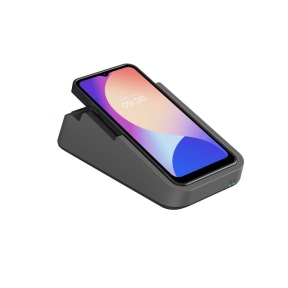
MPN: I23M03432NFC
MOBILE POS DEVICE SWIFT 1 PRO/I23M03 4 32 NFC IMIN
8-Core, QuadxA73 and QuadxA53, 2.0GHz
Android
4GB
8-Core, QuadxA73 and QuadxA53, 2.0GHz
Android
4GB

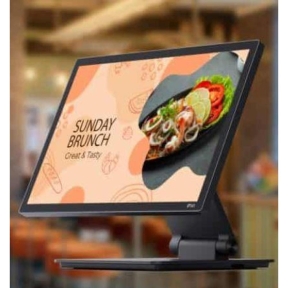

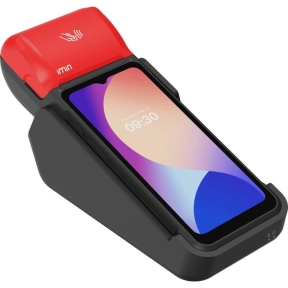

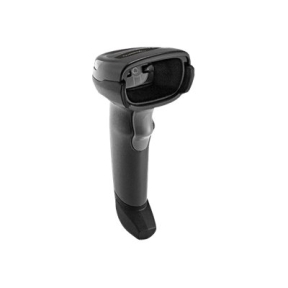

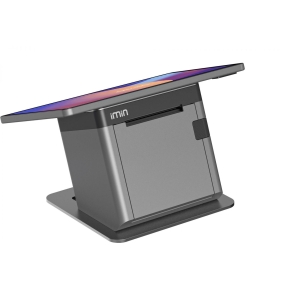

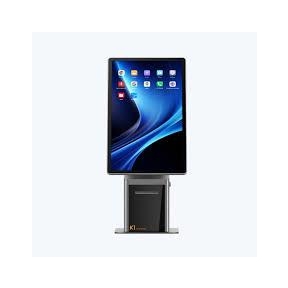

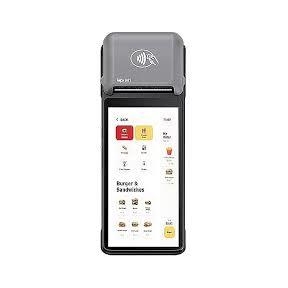
Point of Sale equipment overview
Point of Sale (POS) equipment is the hardware at the checkout counter and on the shop floor: terminals that run the till software, mobile PDA (Personal Digital Assistant) scanners that move stock around the store, receipt printers, barcode scanners, cash drawers, customer displays, card payment terminals and the small accessories that hold them all together. The category groups all of this under one section so retail, hospitality and warehouse buyers do not have to dig through generic IT subcategories to find shop-floor hardware.
This page is the entry point for buyers planning a new till, equipping a new branch or replacing failing hardware in an existing store. Specific products live in the two subcategories below; everything mentioned here points at one of them.
How to plan a POS rollout
Start with the till software
POS hardware is mostly chosen to fit the till software the business runs (Erply, LS Retail, ICR Evolution, Microsoft Dynamics RMS, custom systems). The software vendor publishes a hardware compatibility list; sticking to it removes most of the integration risk and shortens deployment time. For a new business choosing software and hardware together, ask each shortlisted software vendor for their tested POS terminal models.
Decide between terminal and tablet
Dedicated POS terminals (touchscreen all-in-ones, PC-based POS) are designed for shop-floor life: spill-resistant keyboards, fanless chassis, durable touchscreens, long manufacturer warranty terms. Tablet-based POS (iPad with a stand, Android tablet in a case) is cheaper to buy and faster to set up but less tolerant of dust, drops and spills. For a single till in a small cafe, tablet POS often makes sense; for a chain of supermarkets, dedicated terminals win.
Map the peripherals to the workflow
Each peripheral solves one job: receipt printing, barcode scanning, card payment, weighing, customer display. List the workflow at the till and choose only the peripherals that earn their place. A clean till is faster than a cluttered one.
Plan for manufacturer warranty and replacement
POS hardware fails at the worst possible moment: during peak trading. Specify manufacturer warranty with on-site or next-day replacement, and keep a small spare stock of the items that fail most often (cash drawer cables, receipt printer cutters, scanner triggers).
Subcategories at a glance
POS Terminals and PDAs
The computing hardware: dedicated POS terminals at the counter and rugged PDA scanners for stock moves on the shop floor and in the warehouse.
POS Accessories
Everything around the terminal: receipt printers, cash drawers, barcode scanners, card payment terminals, customer displays, mounting arms, cables and consumables.
What to confirm before ordering
- Which till software, and what is its hardware compatibility list?
- Number of tills and PDAs across all branches?
- Indoor counter use, outdoor markets, warehouse, or mixed?
- Card payment integration: built-in PIN pad, separate terminal, mobile?
- Warranty tier and replacement plan for peak trading periods?
Frequently asked questions
Can we use a regular PC as a POS terminal?
Technically yes; in practice no. Regular PCs lack the durability and the keyboard, touchscreen and chassis design needed for shop-floor use. They also rarely include the integrated payment terminal options and certified accessory support. For one or two tills used lightly, a regular PC plus a USB receipt printer can work. For a real retail operation, dedicated POS hardware pays back through reliability and reduced downtime.
How long does POS hardware last?
Five to seven years is typical for terminals and PDAs in normal use; receipt printers and cash drawers often last longer. The wear items (printer cutters, scanner triggers, charging contacts on PDAs) are replaceable and last one to three years depending on use intensity.
Are POS terminals tied to one till software?
Most modern POS terminals run Windows IoT, Android or Linux and can be repurposed across till software, as long as the new software supports the hardware. Tablet-based POS is the most flexible since the tablet runs the software like any app. Dedicated terminals with embedded vendor-specific firmware are less flexible but usually outlast the software they originally shipped with.
Do we need a separate card payment terminal?
For most businesses, yes; card payment terminals are certified and supplied by the acquirer and integrate with the till software through a published protocol. A few POS terminals include integrated PIN pads, which save desk space at the cost of being tied to one terminal model.
Can one PDA be used across several stores?
Yes, if the till software supports multi-store login on the device. Specify enough battery for a full shift and a charging cradle in each store. For warehouse stocktakes, ruggedised PDAs with longer-life batteries and more durable casings are worth the price difference.